
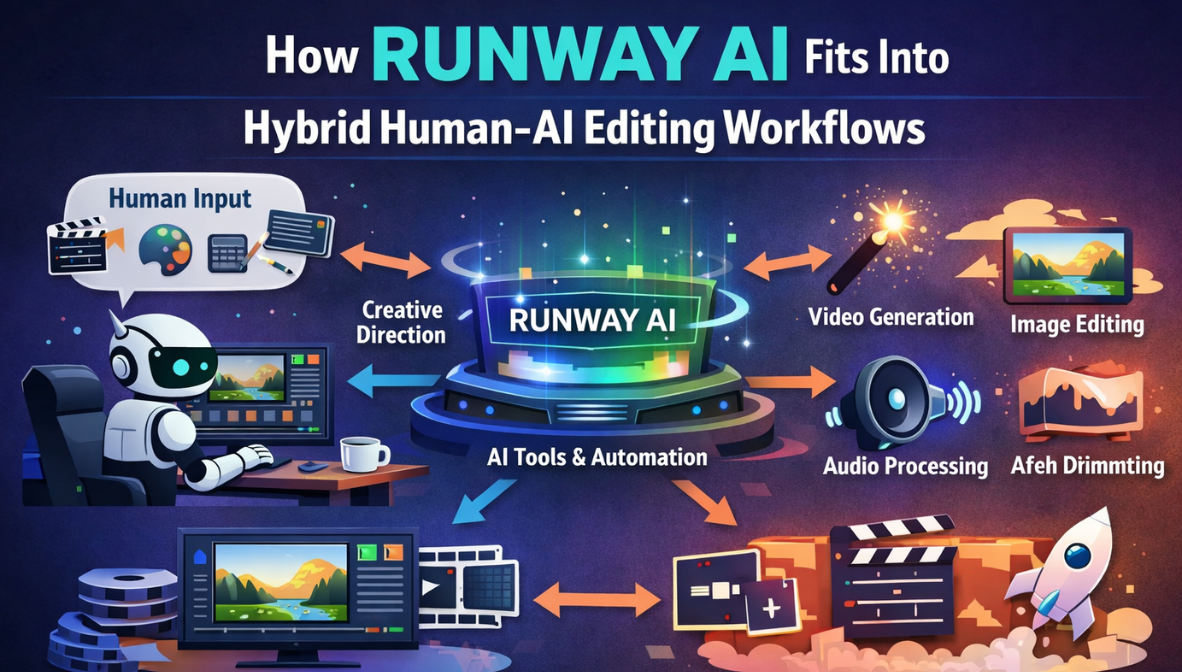
The editing landscape is changing fast. Creators, editors, and production teams are increasingly blending human creativity with artificial intelligence to speed up workflows without compromising quality. Among the tools leading this transformation is Runway — an AI-powered video editing platform that enables hybrid human-AI collaboration. Integrating AI tools like Runway into traditional editing timelines allows creators to automate repetitive tasks, focus on higher-level creative decisions, and produce engaging content more efficiently.
In this article, we’ll explore how Runway AI fits into hybrid editing workflows, its benefits and limitations, and how other editors — from independent creators to marketing teams — can use it effectively. We’ll also highlight how platforms like invideo have integrated Runway into their systems, making this technology even more accessible for creators of all levels.
What Does a Hybrid Human-AI Editing Workflow Look Like?
A hybrid editing workflow is one in which human editors and AI tools collaborate to complete editing tasks. Instead of replacing humans, AI augments their capabilities, handling routine or technical jobs while humans contribute strategic creativity, judgment, and storytelling.
Traditionally, editors spend hours cutting footage, trimming clips, color grading, and fixing audio. While these are important tasks, they don’t always require human intuition. This is where AI shines — offering automated assistance that speeds up the process significantly.
A hybrid workflow typically includes:
- Human decision making: Story structure, pacing, creative direction
- AI automation: Scene detection, object tracking, masking, frame interpolation
- Human refinement: Artistic adjustments, fine color grading, emotional tone
- AI enhancement: Resolution upscaling, background adjustments, audio cleanup
Runway AI fits seamlessly into this model, helping streamline the most repetitive, time-consuming steps of editing.
Introducing Runway AI for Hybrid Video Editing
With the landscape shifting rapidly, tools like the runaway AI video generator have emerged to help creators automate content generation and editing. Runway uses modern AI models to simplify complex editing tasks — from automatically removing backgrounds to generating creative effects or isolating objects within frames.
Creators can now delegate parts of their workflow to AI while keeping creative control over the final output. This powerful combination of human insight and machine efficiency helps teams produce higher volumes of content, faster.
Additionally, platforms like invideo have recognized the value of embedding AI tools directly into broader creative ecosystems. By integrating Runway into their suite, invideo allows users to access intelligent editing features without leaving the platform — making hybrid workflows even more smooth and practical.
How Runway AI Helps With Core Editing Tasks
Below are key editing tasks where Runway AI significantly enhances productivity in a hybrid workflow:
1. Automated Background Removal
One of the most common and tedious parts of editing is background cleanup — especially when shooting on the go or in uncontrolled environments. Runway’s AI can automatically detect and remove backgrounds, allowing editors to focus on composition and storytelling rather than masking every frame manually.
This automated masking is especially useful for creators producing social videos, tutorials, and product demos.
2. Object Tracking and Isolation
Tracking moving subjects through frames can be time consuming. Runway’s AI can track objects or subjects automatically, enabling editors to apply effects or transitions more precisely. This is especially useful in sports footage, documentary editing, and creative storytelling where visual elements move unpredictably.
3. Scene Detection and Clip Organization
Before an editor even begins refining a timeline, they must examine footage, identify key moments, and cut clips. Runway can automatically break down long recordings into scenes based on visual cues, making it easier to locate the best takes without manual scrubbing.
This is a huge time saver for long shoots like interviews or event coverage.
4. AI-Assisted Effects and Enhancements
Creators often use effects like color grading or stylistic filters to give videos a unique look. Runway’s AI can suggest or apply cinematic enhancements based on prompt-driven inputs, helping maintain visual consistency without manual adjustments.
This speeds up workflows and helps align aesthetic decisions more easily.
Enhancing Hybrid Workflows With Invideo Integration
While standalone AI tools like Runway are incredibly useful, having them integrated into broader editing ecosystems makes hybrid workflows even more practical.
Invideo has now integrated the Runway AI video generator directly into its platform, giving users access to powerful AI editing features without leaving the environment where they create and refine content. This means creators can generate, edit, and publish videos in one seamless workflow — combining the strengths of both human and machine.
This integration allows users to:
- Access AI video enhancement features with familiar controls
- Apply effects and automation without leaving the editor
- Move easily between AI generation and creative refinement
- Combine clips, audio, text, and AI-enhanced visuals together
By simplifying the AI adoption process, invideo helps creators take full advantage of hybrid workflows without needing deep technical expertise.
Integrating Runway AI in Video Teams and Workflows
Hybrid workflows should not be intimidating. When implemented thoughtfully, they can improve turnaround times and allow creative teams to focus on higher-value tasks.
Here’s how production teams typically use Runway AI within hybrid environments:
Pre-Production Brainstorming
Runway can be used during planning to generate visual references or test mood ideas. Editors can prototype styles and transitions using AI outputs before filming starts.
Rough Cut Creation
AI can assemble a first draft of the timeline based on scene detection and key markers, which editors then polish. This is especially useful when handling large volumes of footage.
Rapid Iteration
When deadlines are tight, Runway helps create several visual variations quickly. Editors can then choose one and refine it further.
Collaborative Workflow
Hybrid editing encourages collaboration. One team member works with AI-generated clips while others manage sound design, narration, or client direction. This parallel processing shortens production cycles.
The Benefits of Hybrid Human-AI Editing Workflows
Using AI tools like Runway in conjunction with human creativity offers a range of advantages:
Speed and Efficiency
AI automates repetitive tasks, saving hours of manual work. This is particularly valuable for content teams producing daily or weekly videos.
Consistent Quality
By delegating technical tasks to AI, editors can maintain consistent visual quality across projects, even when under time pressure.
Creative Focus
AI removes grunt work, enabling humans to focus on storytelling, tone, and emotional impact — aspects that machines can’t fully replicate.
Scalability
Hybrid workflows make it possible to scale production without linearly increasing team size. Smaller teams can handle larger video loads.
Limitations and Considerations
While Runway and similar AI tools are powerful, there are some things editors should be aware of:
AI Is Not a Complete Replacement
AI gives suggestions and outputs, but human refinement is required for cohesive storytelling and emotional nuance.
Output Quality Depends on Input
AI performance is tied to footage quality. Poor lighting or unclear subjects can still confuse even the most advanced models.
Ethical and Creative Responsibility
Editors should be mindful of how AI is applied, especially when generating or altering content involving people, sensitive topics, or copyrighted material.
Best Practices for Using Runway in Hybrid Editing
To get the most out of Runway AI in hybrid workflows, consider the following tips:
Start With a Clear Plan
Human editors should define the creative direction before involving AI tools. Clear goals help AI contribute effectively.
Use AI for Repetitive Tasks
Delegate masking, object tracking, and scene detection to the AI while humans focus on pacing, emotion, and narrative.
Review and Refine Outputs
AI can generate drafts quickly, but human judgment remains essential for final edits and quality control.
Stay Updated With Tool Improvements
AI tools evolve rapidly. Keeping up with updates ensures you’re maximizing available capabilities.
Conclusion
Hybrid human-AI editing workflows are becoming the new standard in video production. Tools like Runway AI bridge the gap between automation and creativity, allowing editors to leverage machine power without losing human insight.
In practice, this means greater efficiency, consistent quality, and faster production cycles. By integrating AI tools directly into platforms like invideo, creators can enjoy a more intuitive and streamlined experience — generating, refining, and publishing content all within a unified environment.
As AI continues to improve, hybrid workflows will only become more capable and widespread, enabling creators to tell better stories in less time and with greater flexibility.







Leave a Reply